
-
About
ExploreUp a level (this gets replaced in JS)
-
Strategic Plan
Explore
-
College Overview
Explore
- Dean's Lecture Series
- Environmental Health Sciences
-
Diversity, Equity and Inclusion
Explore
-
Get Involved
Explore
-
People
Explore
-
Achievements
Explore
- Administrative Offices
- Discover HHD
- College News and Events
- Commencement
- Contact Us
-
Strategic Plan
-
Undergraduate
ExploreUp a level (this gets replaced in JS)
-
Getting Started
Explore
-
Student Support
Explore
-
Get Involved
Explore
-
Gain Experience
Explore
-
Careers
Explore
-
Get Connected
Explore
-
Policies and Procedures
Explore
- Summer Session
- Discover HHD
- Visit and Apply
- New Student Orientation Program (NSO)
- Undergraduate News
- Commencement
- Contact Us
-
Getting Started
-
Graduate
ExploreUp a level (this gets replaced in JS)
-
Getting Started
Explore
-
Student Support
Explore
-
Student Profiles
Explore
-
Get Involved
Explore
-
Get Connected
Explore
-
Gain Experience
Explore
- Environmental Health Sciences
-
Diversity, Equity and Inclusion
Explore
-
Commencement
Explore
- Discover HHD
- Admissions
- Contact
-
Getting Started
-
Online & Outreach
ExploreUp a level (this gets replaced in JS)
-
Online Degrees and Programs
Explore
-
Outreach Programs
Explore
-
Short-term Courses
Explore
-
Teaching Support
Explore
- Contact Us
-
Online Degrees and Programs
-
Research
ExploreUp a level (this gets replaced in JS)
-
Researcher Resources
Explore
-
Research Units
Explore
-
Ongoing Research
Explore
-
Diversity, Equity and Inclusion
Explore
- Environmental Health Sciences
-
Get Involved
Explore
-
Stay Connected
Explore
- Discover HHD Research
- Research News and Events
- Contacts
-
Researcher Resources
-
Alumni
ExploreUp a level (this gets replaced in JS)
-
Become a Member
Explore
-
Resources for Alumni
Explore
-
Building Diversity and Inclusion
Explore
-
Get Involved
Explore
- Meet Our Volunteer Leaders
-
Stay Connected
Explore
- Alumni Achievements
-
Parents and Family
Explore
- Donate
- Attend an Alumni Event
- Give to HHD
- Update Your Contact Information
- Contact Us
-
Become a Member
-
Contact
Explore
-
Departments
Explore
-
Research Centers
Explore
-
Central Administration
ExploreUp a level (this gets replaced in JS)
- Dean's Office
- Center for Student Advising and Engagement
- Communications and Marketing
- Development and Alumni Relations
- Facilities
- Finance and Accounting
- Human Resources
- Information Systems and Services (ISS)
- Online Education and Outreach
- Research and Graduate Education
- Office for Diversity and Inclusion
- Office for Faculty Affairs
-
Training and Support
Explore
- Contacts/Directory
Box Transition
Phase 3 — Post-Migration
UPDATED: Thursday, February 18
The migration activities are complete and you are now able to work with the migrated data in your new "Box Migration Data" OneDrive folder. Additional information concerning Phase 3 is available under the Post-Migration section of the migration website.
During this phase make sure to:
- Review any error reports that you may receive from ISS. Not all users will receive an error report and in the unlikely event that you do receive one, ISS will provide further information on how to proceed.
- Locate your files in the “Box Migration Data” folder in OneDrive by visiting onedrive.psu.edu and re-establish permissions for external collaborators, as needed.
- Communicate that your migration is complete by sending OneDrive links to any file collaborators external to Penn State and notify internal collaborators that the files you shared with them are accessible in their OneDrive “Shared with Me” tab.
For further information on how to use OneDrive please visit https://hhd.psu.edu/faculty-staff/information-systems-and-services-iss-computing-support/it-help/office-365-help.
You can also visit https://storage.psu.edu/training-resources/ for more training and resources.
Please contact the ISS Helpdesk if there are any questions or you are experiencing any issues.
Note: Some of you may not have received an email confirming completion but all HHD faculty and staff accounts have been migrated unless otherwise specified in a ticket with ISS. Graduate students and undergrad students were not a part of this migration but will be migrated by Penn State IT at a later date.
As announced last year, Penn State will retire Box as a cloud storage and collaboration service. HHD Faculty, and staff files will be migrated to equivalent Microsoft Office 365 services.
The College of Health and Human Development will soon be completing the data migration from Box to Microsoft Office 365. Files stored on Box will be migrated to the Microsoft Office 365 services OneDrive and SharePoint beginning the first week of February 2021.
Office, Lab, Unit Files
Shared accounts belonging to your office, lab, or unit used for group collaboration—known as Non-Person Accounts (NPAs)—are also part of this transition. These accounts are typically identifiable by a "b-" prefix on folders in Box.com, although there may be some exceptions.
NPA owners already received email communication from the college's Information Systems and Services (ISS) regarding NPA migration. If you are the owner of an NPA and require additional assistance or did not receive an email from ISS, please contact ISS at iss-helpdesk@psu.edu or call 814-865-INFO.
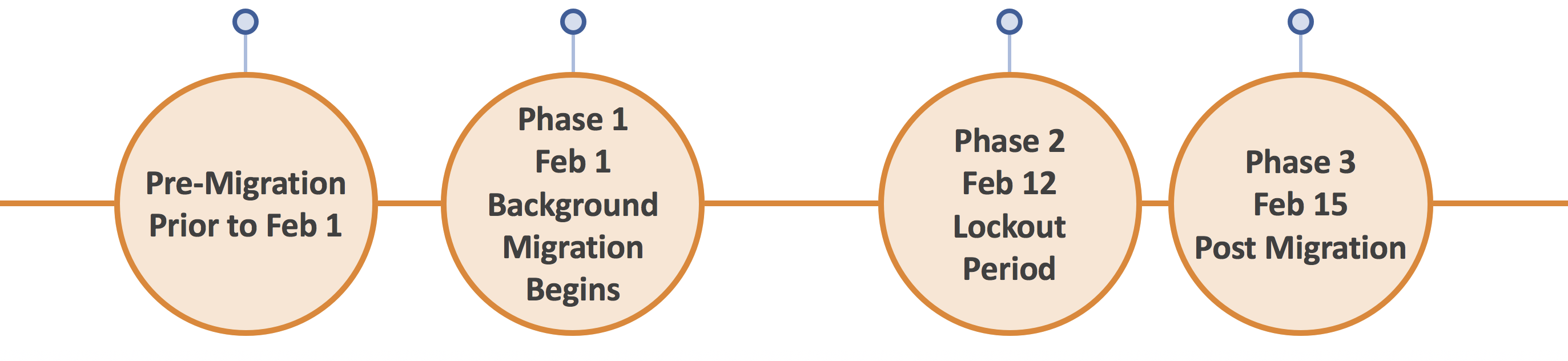
Project Timeline and Phases
- Pre-Migration
- Phase 1 — Background Migration
- Phase 2 — Lockout Period
- Phase 3 — Post-Migration
-
-
Start cleaning up your files in Box now. Delete any unnecessary files and remove yourself or your unit from any shared files or folders that you no longer need or want access to.
-
-
Comments posted to a file in Box will not migrate to Office 365. To preserve Box Comments copy and paste them directly into the file. Any comments made directly in Office 365 files (i.e. comments in a Word document) will remain after migration.
-
-
Review the article Box: Pre-Migration Preparation Special Use Cases.
-
-
Preserve previous document versions of office files, as needed. The most current file version will migrate, previous file versions will not.
-
-
Notify your internal and external (non-Penn State) collaborators of your migration date and make note of non-Penn State shares which will need to be manually restored in post-migration. Templated communication is available on the Penn State Storage site.
Phase 1 — Background Migration
Scheduled for Feb. 1–12, 2021
Phase 1 kicks off the actual migration of Box data. The college's migration will begin the first week of February and is expected to take two weeks. The migration process will deliver a copy of your Box data to a folder in your OneDrive labeled "Box Migration Data". A few days prior to the start of Phase 1 you will receive a reminder notification alerting you to the start of Phase 1.
-
-
Continue to access and update your files in Box as normal. Creating new files and folders is permissible.
-
-
Do not move or rename files or folders in Box, otherwise duplicates may be created which could delay the migration. Also do not delete files in Box.
-
-
Do not access the newly created folder in OneDrive, called "Box Migration Data", the folder into which your Box files will be copied.
Phase 2 — Lockout Period
Scheduled for Feb. 12–15, 2021
There will be a period of time after the completion of Phase 1 where you will need to refrain from use of both Box and OneDrive.
-
-
Do not make any changes to files in Box or OneDrive during Phase 2. Changes made during this period may not save.
-
-
Access your OneDrive data after you receive a migration completion email from the Penn State IT Box Migration Team. Migration completion emails may be received at any time during Phase 2.
Phase 3 — Post-Migration
Upon completion of Phase 2 (exact dates will vary)
The migration activities are complete and you are now able to work with the migrated data in your new "Box Migration Data" OneDrive folder. Additional information concerning Phase 3 is available under the Post-Migration section of the migration website.
-
-
Review any error reports that you may receive from ISS. Not all users will receive an error report and in the unlikely event that you do receive one, ISS will provide further information on how to proceed.
-
-
Locate your files in the “Box Migration Data” folder in OneDrive and re-establish permissions for external collaborators, as needed.
-
-
Communicate that your migration is complete by sending OneDrive links to any file collaborators external to Penn State and notify internal collaborators that the files you shared with them are accessible in their OneDrive “Shared with Me” tab.
Additional Resources
Penn State's Box Migration website has information on preparing your files and folders for a smooth transition.
Office 365 Quick Start guides
Information Systems and Services (ISS)
16 BBH Building
University Park, PA 16802
Helpdesk
iss-helpdesk@psu.edu
814-865-INFO (4636)
Hours
Monday-Friday by Appointment Only
8 a.m. - 4:30 p.m.